
How to Make Instagram more Glamorous!
Updated: Jul 3, 2023
Instagram is an important tool to use when creating a new business. So why not make it more Glam to the eyes for your followers. Here are steps on how to make your instagram pop!

"The comfort-zone is the greatest enemy to creativity." -Dan Stevens
We will be making our instagram highlight-icon story POP! POP! POP! Now lets get creative...! Below you will see the steps to take to make your instagram incredible with an added bonus of images to go with the steps. You're welcome. 😉
Step-1. Create a Canva.com account.
Canva.com is a website my husband and I came upon whilst researching how to work social-media. It is a great website for social media and other projects like the one we are about to embark on. You may use your computer or the #Canva app on your phone but for this tutorial I will be using my computer.
Step-2. Click on 'Create a Design' on upper right-hand side.

Step-3. Click on 'Use Custom Design' on upper left-hand side. Then enter Dimensions '1080 x 1920 px.' Then click on 'Design.'

Once you click on 'Design,' then this page will appear

Step-4. (Optional) Download this free Instagram-Stories-Highlight Icons, click the link below.
https://get.later.com/free-instagram-highlights-icons/
Enter the information needed below and continue to step-five.

Step-5. Add your 'free icons,' into Canva.com
Open your downloaded file
Click on 'downloads,' then click on the folder that was just downloaded, 'later- instagr...ighlight-icons.'

Open the 'Icons Only,' folder.

Click on the 'Icons' you would like to use (Optional)

Select and Drag the icons above into your Canva.com account. You will see the arrow bubble filling-up with blue water or liquid, which means it is downloading into your account.

You will see all your icons downloaded and ready to be used. YAY! Almost done...

Here is another alternative if you do not mind signing-up with Canva.com for more options. You can also go to the top-left-hand-side of the left tool-bar and click on search. Then click on illustrations or photos (up to you) and type 'Icons,' in the search bar. You will see a lot of free icons as well as some that aren't free but if you sign-up with Canva.com for a free trial you will be able to use most photos/illustrations that #Canva provides. Thanks Canva.com.
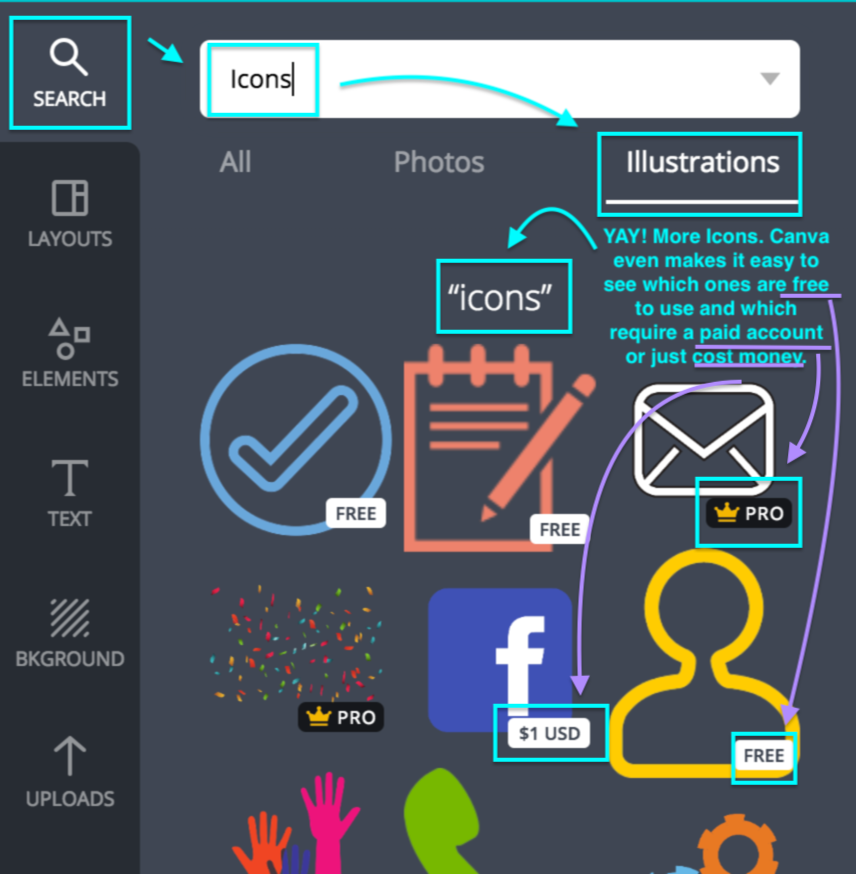
Step-6. Once you are done with Step-5, the fun part begins. First Search for a background, if you want to make your instagram story pop more.

Step-7. Then search or click on the icon you want for your Instagram Highlight Story.

Step-8. Center the icon you have chosen (#Canva makes that easy and does it for you). You will also need to resize the image.

Step-9. Add a new page and repeat
Click ‘Add a new page’ located below your background to create a new Instagram Story Highlight Cover.
You can change your background design (optional) and then add a new icon.
Once you are done, just repeat the process until you’re done creating Instagram Story Highlight Covers.

Step-10. Once you are done with all your Instagram Story Highlights proceed to the download button on the upper right-hand side and save to your computer.

Step-11. YAY!! You're done, now you just have to send yourself your finished master piece. Upload them to your Instagram story highlights and you're ready to show-off your new instagram account.
If there are any questions or anyone needs help with their Instagram story or how to work Canva.com, notify me and I will help you as soon as I can. Hope you enjoyed this blog and remember to always A.B.C.
Besitos 🌿 With Aloha,
Them Plus Us Ohana


Comments